
TATEMS: Fleet Maintenance Software update 12/5/2022 (Dec 5, 2022) to 4.6.30.017
The update process should only take about 2 minutes or less per computer. The video takes longer than that because it thoroughly goes over each step
(The download link is near the bottom of this page)
Warning!! Read this entire message before updating!! Especially the Backup Instructions or Watch the Video above!!
Just a quick note to announce the release of TATEMS 4.6.30.017
Watch the video below to see what’s in TATEMS version 4.6.30.010 Released May-3-2022. The version on this page is 4.6.30.017 Released Dec 5, 2022.
If you are running a version released before version 4.6.30.000, this 4.6.30.017 update will need a new registration number (please make sure you are eligible) and will also backup and update your backend database.
Once you update your computer then all other users will be required to update as well.
If you are already running a licensed and registered copy of TATEMS then this release will require you to acquire a new registration number.
This is to prevent any unauthorized access to the new releases after the purchased term of version updates and support has expired.
To minimize any inconvenience to you, this release will give you 21 days to acquire the new registration number.
If you are in your trial period then the trial period will continue with the same number of days you had remaining before the update.
AFTER UPDATE…You will need to submit a ticket with your computer name, serial number(s) along with the version number (from the TATEMS registration screen) along with your company information or purchase information here so that we can verify eligibility and email the new registration number(s) back to you.
Remember, you don’t need to apply all previous updates in order to update TATEMS Fleet Maintenance Software.
This update will only work with TATEMS Version 3.1.00 or later already installed.
To see a list of new features added Click Here
Here are the steps to update that we go over in the video above:
- Determine where your data file is
- Backup your data file
- Determine your operating system (32 bit or 64 bit)
- Download the proper update file
- Open the file->Click OK->Unzip->Ok->Close
- Make sure all other users are out of TATEMS
- Open TATEMS
- Request new reg key if needed, you have 14 days to get a new key if needed
- Relink to data file if on a network (If upgrading from an older version that did not store network settings)
- When reg key arrives then enter it
- You will need to enter the reg key into the local data file as well so keep a copy in case you become unlined from your server if running over a network.
NOTE: Updating a Terminal Services/Remote Desktop Services or Citrix Server…
You have to update the tatems2005.mde file in each user’s subfolder. Otherwise, it’s the same as in the video above. If you are not familiar with how TATEMS is supposed to be set up on a TS / Remote Desktop Services Server (RDS) see the KB article and videos here.
You can download the latest TATEMS Fleet Maintenance Software update from the links below:
For 32 Bit Versions of Windows use the link below:
Download TATEMS Update for 32 Bit Windows Or Alternate Download Server Here TATEMS-4.6.30.017.exe (This is the update link…right click and choose “Save Link/Target As” depending on your browser)For 64 Bit Versions of Windows use the link below:
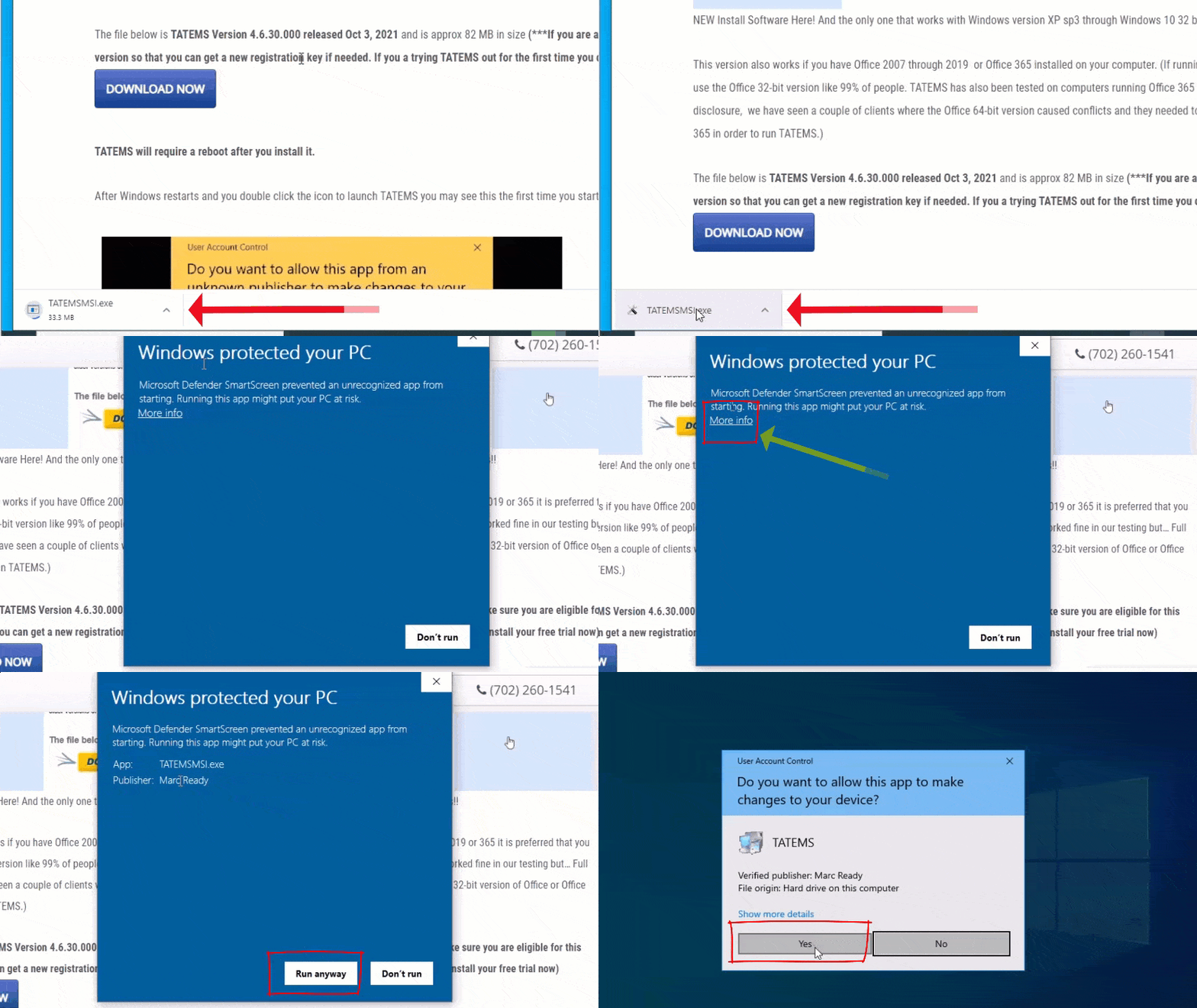
Download TATEMS Update for 64 Bit Windows Or Alternate Download Server Here TATEMS-4.6.30.017×64.exe (This is the update link…right click and choose “Save Link/Target As” depending on your browser)Possible Warnings when Downloading With Google Chrome
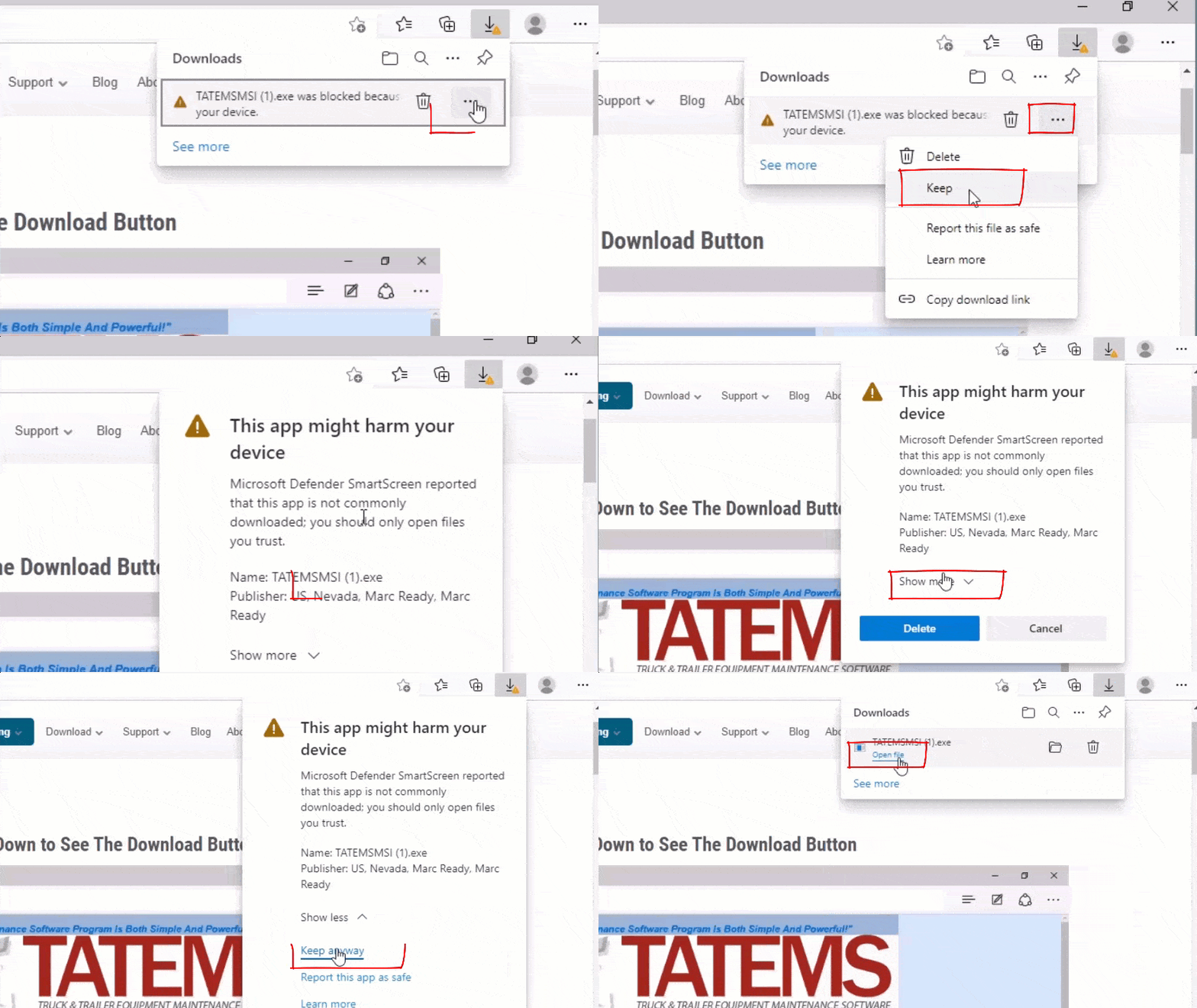
Possible Warnings when Downloading With Microsoft Edge (Newer Chromium Version)
Always make sure you make a backup copy of your data before updating.
The data file to backup is called
TATEMS2005be.mdb and is normally located in the:
C:\Program Files\TATEMS 2005
Folder. (It might also be on a network drive if you are networked. You can see the data file you are accessing before you update by clicking on Tools->Networking)
You can just right click on the file and choose copy and then paste it back into the same folder or another folder to create a backup copy.
There is also a backup feature in TATEMS 2005 and TATEMS 20/20 if you go to File->Backup and Compact Data
Make sure TATEMS is closed and then after downloading the file you can double-click it to unzip the files:
into:
C:\Program Files\TATEMS 2005
If you are UPDATING TATEMS on a NETWORK you will need to re-link to the data file after the update by going to
“Tools->Networking” from within TATEMS
If you go to Tools ->Networking before updating you will be able to see where the data file is located. Write down the path and then use that information after the update to re-link to the data file.
If you need to renew your support and version upgrades for your TATEMS licenses you can get them here:
If you are not ready to update your entire company to the latest version you can find previous updates here:
https://support.tatems.com/portal/kb/articles/old-tatems-versions-full-install-and-updates